AI Executive Briefing — Start Your Day With Business Clarity.
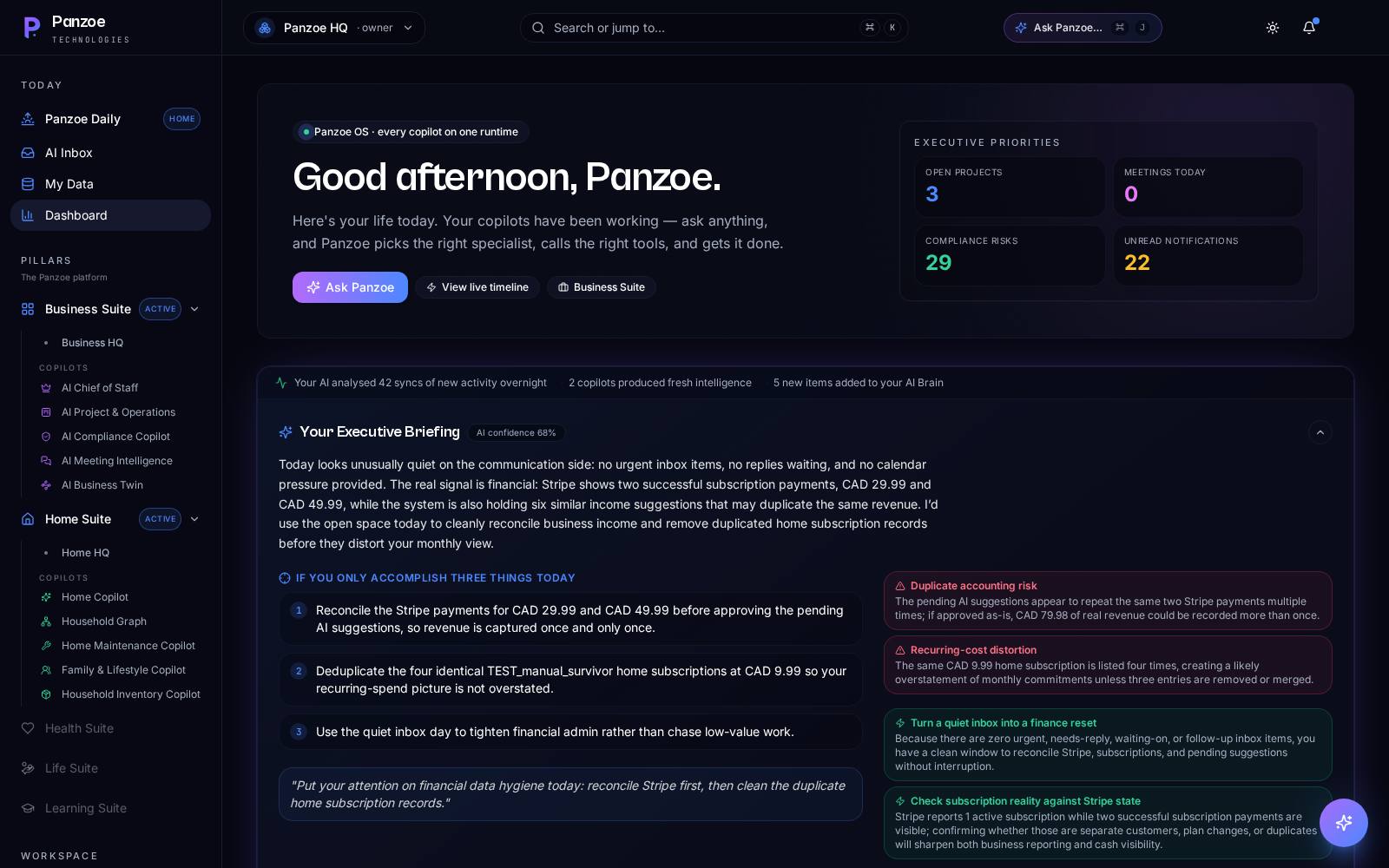
Panzoe's Executive Briefing is a daily, AI-prepared view of what matters in your business: today's priorities, meetings to prepare for, project status, operational risks, decisions waiting on you and the indicators you track — assembled by your AI Chief of Staff from your Business Brain and connected calendar and inbox, and read aloud if you prefer.
Explore free · No card to sign up · Upgrade when you're ready · Current prices in your selected currency on the pricing page
You run the business, but the business runs your morning.
Project updates, risks and decisions arrive in five tools and none of them say what matters first.
Meetings start before you've seen the last email thread about them.
Small risks become big ones because nobody owned the follow-up.
Decisions wait on you, but you only find out when someone chases.
One page, every morning: priorities, meetings, projects, risks, decisions.
Everything below is live in Panzoe Business today. Connected sources (calendar, inbox) are optional; everything else draws on what you and your team record in Panzoe.
Daily executive briefing
A daily business briefing written for you, with a Listen option so you can hear it on the move.
Business priorities
The AI Chief of Staff ranks what needs your attention today across projects, people and decisions.
Meeting preparation
With your calendar connected, today's meetings appear with context from your Brain and related inbox threads.
Project status
Progress, overdue items and blockers from Panzoe Projects, so status comes to you instead of a status meeting.
Operational risks
Risks logged in Risk & Compliance — plus contract renewals and low-stock flags — surfaced before they bite.
Business indicators
Metrics you record in Business Analytics summarised with movement since last time.
Decisions requiring attention
Open items from Actions & Decisions are listed with owners, so nothing waits on you silently.
Business Brain
The shared memory of your company — goals, people, documents, decisions — that every assistant and briefing draws on.
Who starts their day with an AI executive briefing.
See priorities, risks and decisions in one place before the first call.
Track project blockers and operational risks across teams without chasing updates.
Combine contracts, stock, projects and people in a single morning view.
Prepare the leader's day with meeting context and open decisions already gathered.
Connected where you choose, manual where you prefer.
Add goals, people, projects and key documents — or import notes. This is the context for every briefing.
Optionally connect Google or Microsoft calendar and inbox through Integration Hub. Everything else works manually.
Projects, risks, decisions, metrics, contracts and inventory live in their Panzoe modules.
Your executive briefing is prepared daily; tap Listen for the audio version.
Ask follow-ups, delegate to assistants, draft replies or open the project — right from the page.
An executive assistant that knows your business — not just your calendar.
Clear about sources
Connected data (calendar, inbox) is labelled; everything else comes from what your team records in Panzoe.
Actionable
Every item links to the project, risk, decision or thread behind it.
Audio when you need it
Listen on the commute; read at your desk.
Whole-business context
Legal, Inventory, Projects, Analytics and Risk all feed the same Business Brain.
Questions, answered.
What is an AI executive briefing?
A daily, AI-prepared summary of what matters in your business — priorities, meetings, project status, risks, metrics and open decisions — assembled from your Business Brain and connected sources.
What information is connected automatically?
With Integration Hub you can connect Google or Microsoft calendar and inbox. Projects, risks, decisions, metrics, contracts and inventory come from what you and your team record in Panzoe's business modules.
Do I have to connect my email or calendar?
No. The briefing works fully from the information in Panzoe. Connecting your calendar and inbox adds meeting context and email highlights.
What is the AI Chief of Staff?
The Panzoe Business assistant that prioritises your day, prepares the briefing and helps you delegate, draft and decide using the Business Brain.
Can I listen to the briefing?
Yes. The briefing has a Listen option with a natural voice.
Is it free to try?
Explore Panzoe free with no card to sign up, then upgrade when you're ready. Current prices are on the pricing page.
Walk into every day already briefed.
Explore Panzoe Business free and get your first executive briefing tomorrow morning.