AI Memory Support for Everyday Life
Meet Panzoe Memory — a personal AI companion designed to help individuals, families and caregivers manage daily routines, remember important activities and stay connected to what matters.
Included in all paid Panzoe plans · Free accounts can try it with up to 5 reminders and 10 people · A supportive organisational tool — not a medical device
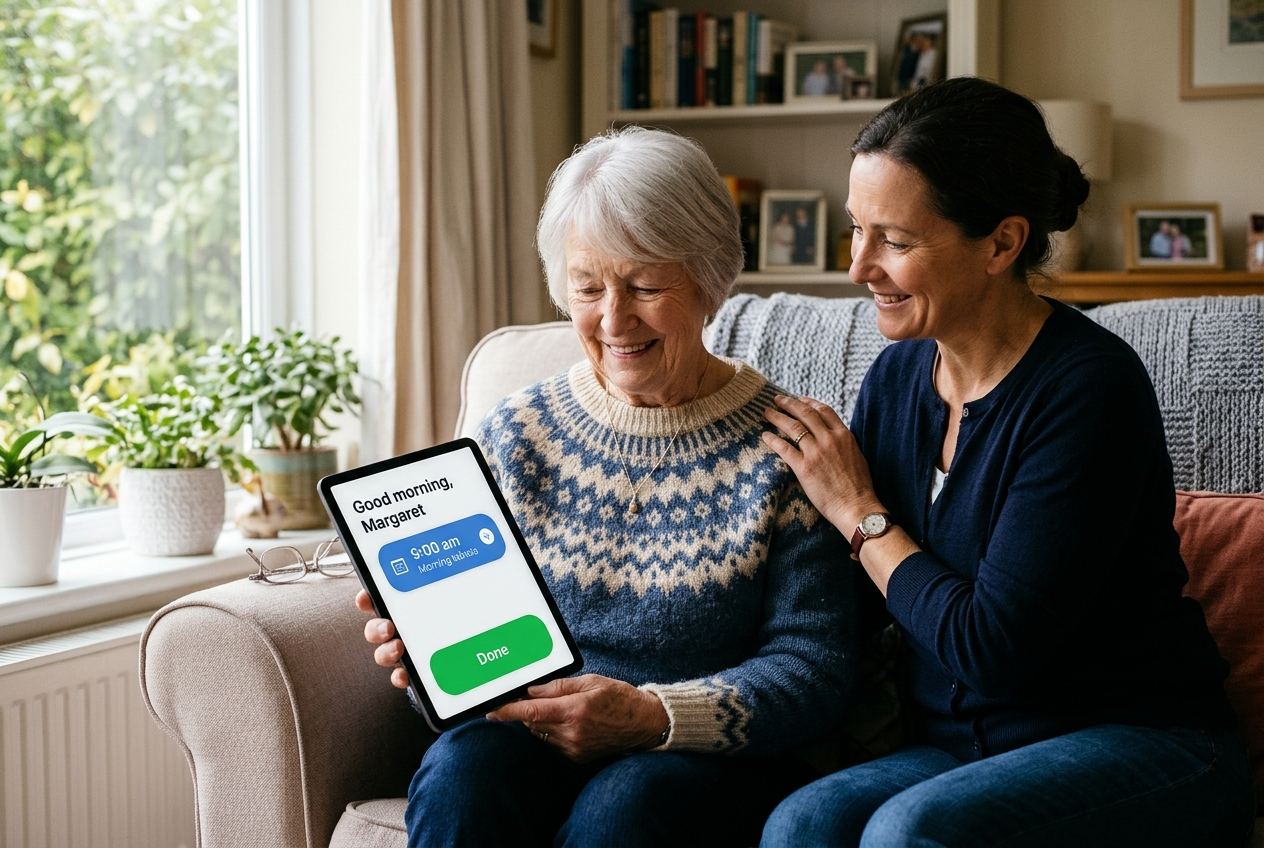
Practical, everyday support — built on the Panzoe you already know.
Panzoe Memory is a module inside Panzoe that turns a phone or tablet into a calm daily companion. It shows what is happening today in large, plain type; delivers scheduled reminders for medication prompts, meals, water, appointments, calls and activities; keeps the names and faces of the people who matter; and stores favourite memories, life stories and “how I like things done” notes that are brought back gently each day.
Families and caregivers set it up and stay in the loop through a Care Circle: they can see what was confirmed, add a memory or a visit, and are alerted — in the app, by push notification and by email — when a reminder is not marked done within the window they choose. A tablet can be enrolled once so the person simply taps “Open My Day”, with no password to remember.
Panzoe Memory is an accessible organisational tool. It reminds and reassures; it does not diagnose, treat, monitor health or give medication advice.
Works alongside Daily Briefing your AI Brain Ask Panzoe
Individuals, families and the organisations that support them.
Individuals and older adults
Stay organised and independent with gentle, reliable prompts: today's plan on one screen, big “Done” buttons, a daily briefing read aloud on request and a companion that answers from your own day, people and memories.
Get StartedFamilies and caregivers
Set up routines and reminders for a loved one, invite siblings with caregiver, family or view-only roles, see what was confirmed each day and be alerted when a reminder is missed — from wherever you are.
Set up for someone you care forCare homes and assisted living
A resident tablet with a short PIN or staff-assisted unlock, staff and family in the same care circle, medication kept to reminder-only prompts and every change audit-logged. Talk to us about using Panzoe Memory in your setting.
Contact us about your organisationEverything below is live in Panzoe Memory today.
Reminders are scheduled deterministically in the person's own time zone — no AI decides when they fire, and nothing shown is ever invented.
My Today
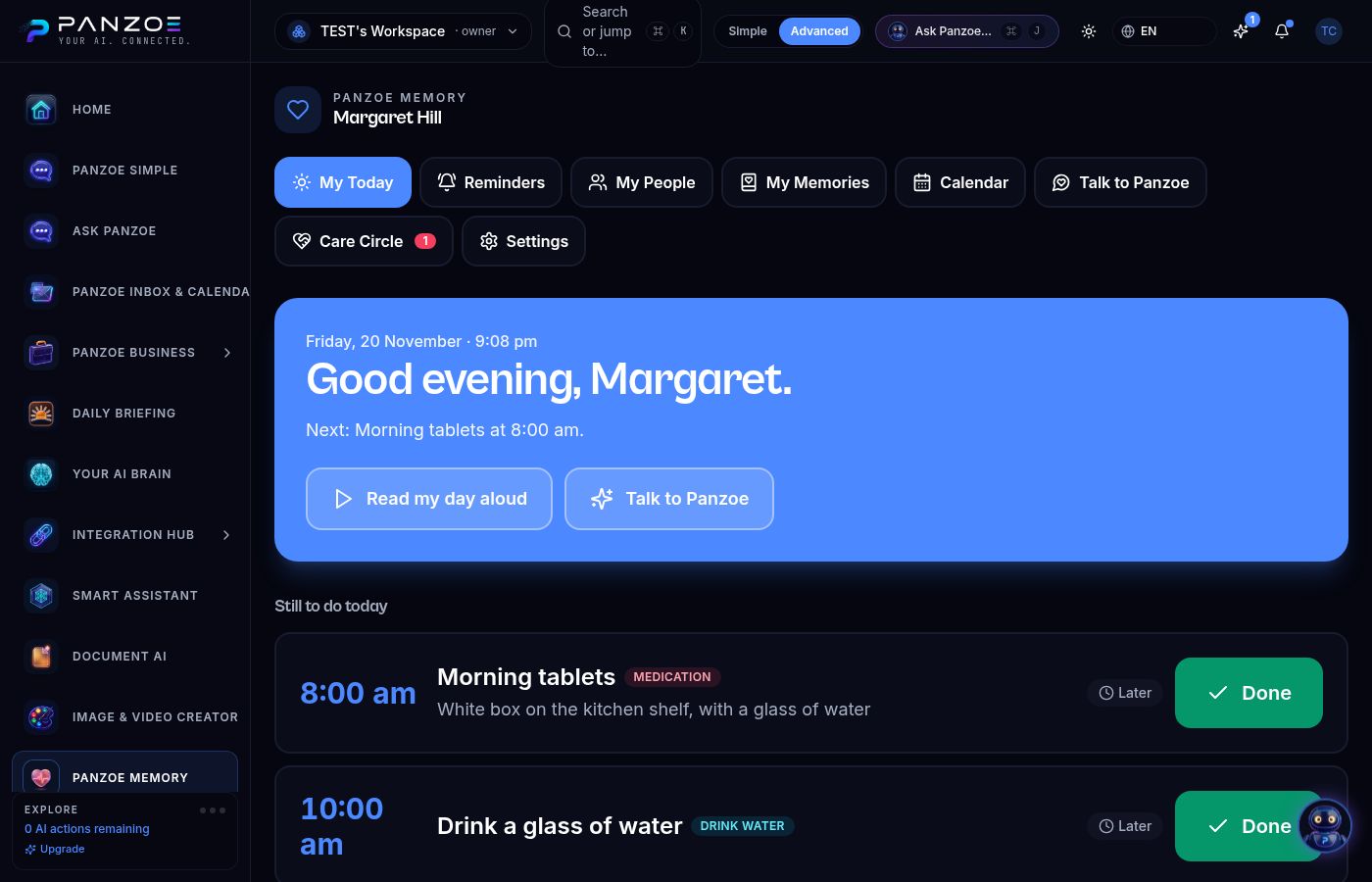
One calm screen: what is next, what is done, who is visiting and something nice to remember. Personalised briefing read aloud on request.
Daily routine reminders
Medication prompts, meals, water, appointments, calls and activities — every day, weekdays, chosen days, monthly or once; several times a day if needed.
Missed-reminder alerts
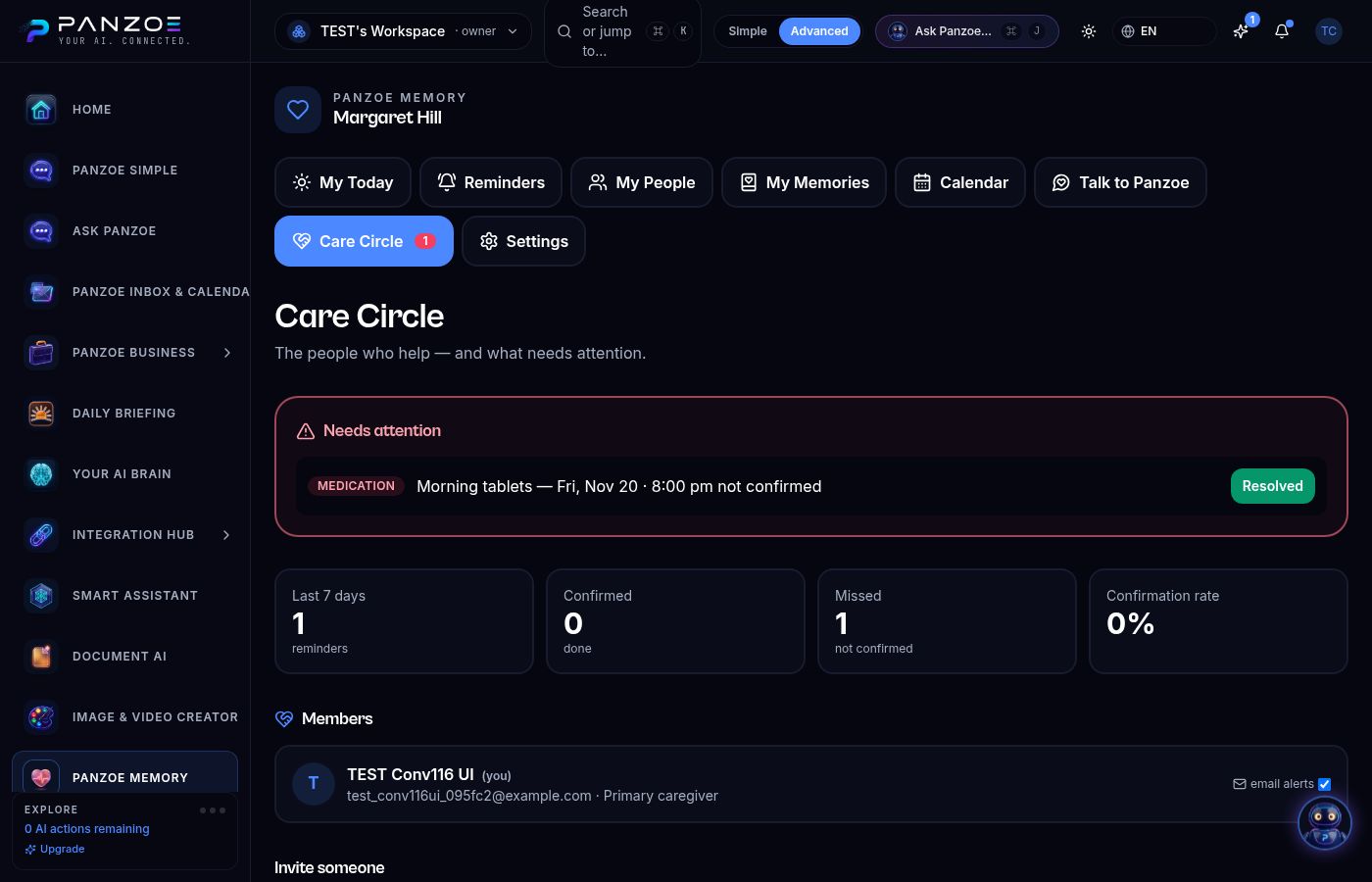
If a reminder is not marked done within the window you set (15–120 minutes), caregivers are alerted in the app, by push and by email, and can resolve it from the Care Circle.
My People
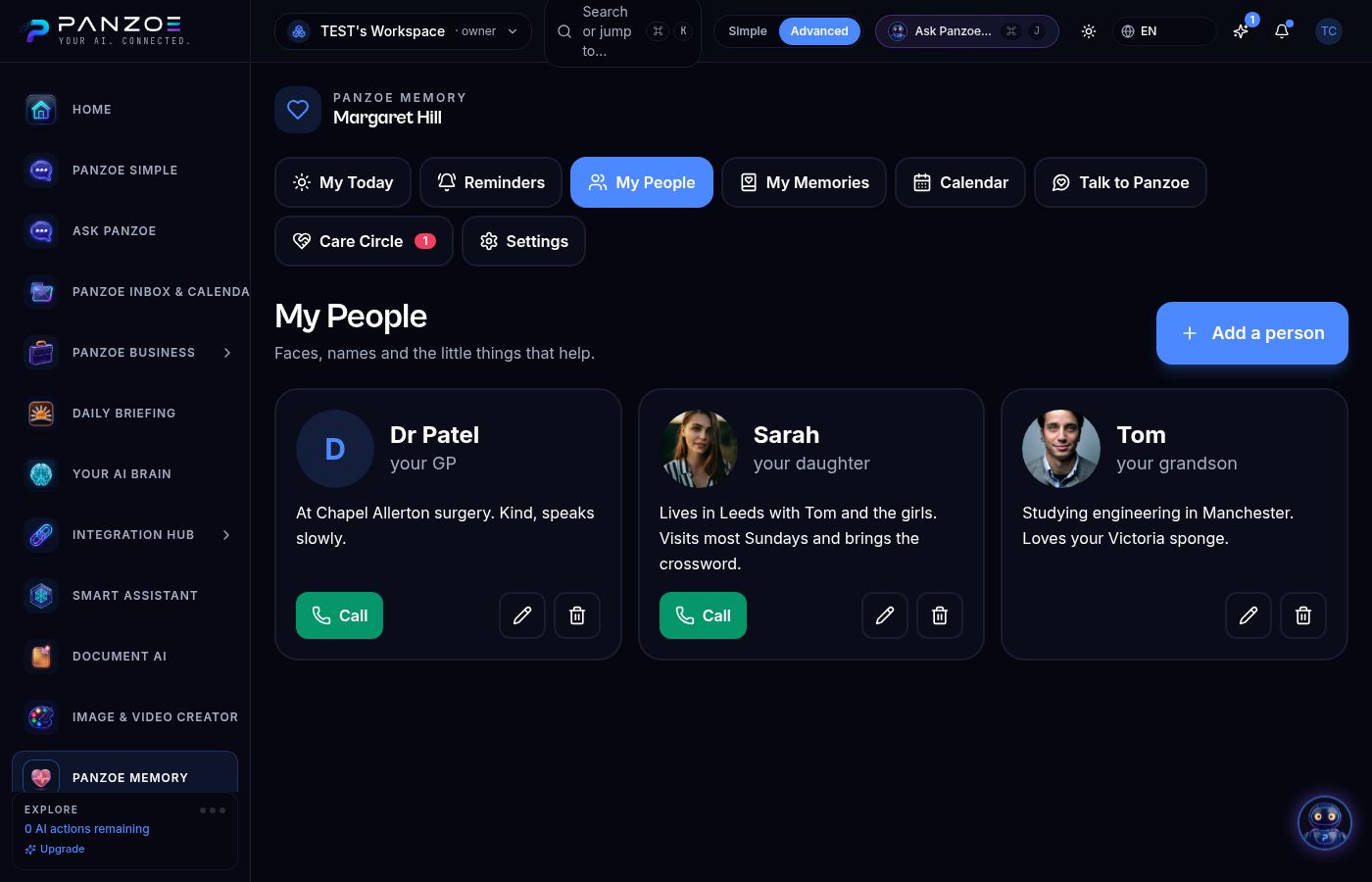
Faces, names, relationship and “a line that helps” — with one-tap calling.
Memory bank
Memories, life story, favourites and routines added by the person or their family, brought back gently each day.
Talk to Panzoe
Press-to-talk companion that answers only from the person's own day, people and memories. Questions about doses are redirected to a pharmacist or doctor; signs of distress alert the care circle.
“Open My Day” tablet mode
A caregiver enrols the tablet once. Personal tablets open with one big button; shared tablets need a short resident PIN or caregiver-assisted unlock. Caregiver settings stay behind caregiver sign-in.
Care Circle
Caregiver, family and view-only roles, invitation by email, confirmation history and a 7-day overview. Access can be revoked at any time.
Calendar view
The week ahead built only from the reminders and appointments written down — nothing else.
Set up in about ten minutes.
Create a free Panzoe account or sign in to the one you already have.
Choose “This is for me” or “I'm caring for someone” and give the person a name and time zone.
Add the reminders that matter most, the people who visit and one good memory. Invite family to the Care Circle.
Reminders arrive on the My Today screen and as notifications; the day can be read aloud; caregivers are alerted if something is not confirmed.
Where families use it.
Keep independence with gentle, reliable prompts and a daughter who is alerted only when something is missed.
See today's confirmations, add a memory or a visit, and share the load with siblings in the same care circle.
A shared tablet in the kitchen with big buttons, and a voice that reads the day aloud.
A resident tablet with PIN or staff-assisted unlock; staff and family in the circle; medication kept to reminder-only prompts.
A respectful helping hand for forgetfulness and memory changes.
Everyday organisational technology can be genuinely useful for people experiencing forgetfulness, age-related memory changes or cognitive difficulties — including families supporting a loved one living with Alzheimer's disease or another form of dementia. A predictable daily structure, prompts at the right moment, familiar faces with a reminder of who they are, and favourite memories brought back gently can all reduce day-to-day friction and anxiety for the person and for those around them.
Panzoe Memory is designed with that audience in mind: large text, a simplified mode, reduced motion, one-tap access on an enrolled tablet, a companion that never invents information, and a care circle that is kept informed.
Please read this clearly: Panzoe does not prevent, diagnose or treat any condition, does not improve memory function, does not monitor a person's health and cannot guarantee that medication is taken. Marking a reminder as done is a note, not proof. Panzoe is a supportive organisational tool and is not a replacement for medical care, professional caregiving or emergency services. If someone is unwell or in danger, contact your local emergency number.
Your family's information stays yours.
Scoped to the care circle
Reminders, people and memories are visible only to the people you invite, with caregiver, family and view-only roles you can change or revoke at any time.
Never used to train AI
Your content is never used to train AI models — the same commitment that applies across Panzoe.
Every change is logged
Changes to reminders, the care circle and enrolled devices are recorded in the account's audit log.
Protected access
Caregiver settings sit behind the caregiver's Panzoe sign-in; a resident tablet only ever receives a restricted view-and-confirm scope, and devices can be removed instantly.
Honest by design.
Nothing is invented
Appointments, medication prompts, people and memories come only from what the family wrote down. The companion says “I don't have that written down” rather than guessing.
Reminders are not AI
Scheduling and delivery are deterministic and idempotent, evaluated in the person's time zone, with explicit confirmed, not-confirmed and missed states.
Not a medical device
Panzoe reminds and reassures. It never prescribes, diagnoses or advises on doses — and says so.
Part of one account
No separate app or subscription: Panzoe Memory lives alongside Daily Briefing, your AI Brain and Ask Panzoe in the account you already have.
Questions, answered.
What is an AI memory assistant?
An AI memory assistant is software that helps someone keep track of everyday life — routines, reminders, the people around them and important personal information — and answers questions about it in plain language. Panzoe Memory does this from information the person and their family write down, so answers are grounded and never invented.
How can Panzoe help with daily routines?
You set up reminders for the moments that matter — medication prompts, meals, water, appointments, calls and activities — on a daily, weekday, chosen-day, monthly or one-off schedule. They appear on the My Today screen in large type with a big “Done” button, can be read aloud, and arrive as notifications.
Can Panzoe remind someone about medication schedules?
Yes. Panzoe delivers medication prompts at the times a caregiver sets and records whether each one was marked done. It does not advise on doses, cannot confirm a medicine was actually taken and is not a replacement for a pharmacist, doctor or care plan.
Can older adults use Panzoe Memory?
It is designed for them: large text, a simplified mode, reduced motion, press-to-talk voice, and a one-tap “Open My Day” tablet screen with no password to remember. A caregiver can handle all the setup.
How can family caregivers use Panzoe?
Create the profile for your loved one, add reminders and people, and invite other family members with caregiver, family or view-only roles. You will see what was confirmed each day and receive an in-app, push and email alert if a reminder is not marked done within the window you choose.
Could Panzoe help someone living with dementia?
Many families find that a predictable structure, timely prompts, familiar faces and favourite memories make daily life calmer for a person living with dementia and for those around them. Panzoe is a supportive organisational tool only: it does not treat or slow any condition, does not monitor health and is not a substitute for medical care or professional caregiving.
Can care homes use Panzoe Memory?
Yes. A resident tablet can be enrolled in shared mode with a short PIN or staff-assisted unlock; staff and family join the same care circle; medication stays reminder-only; and every change is audit-logged. Contact us to discuss your setting.
How does Panzoe protect personal information?
Content is visible only to the care circle you invite, is never used to train AI models, and access can be revoked at any time. Caregiver controls sit behind the caregiver's sign-in, and tablets only receive a restricted view-and-confirm scope. See the Privacy Policy and Trust Centre for the platform-wide commitments.
How do I get started?
Create a free Panzoe account, open Panzoe Memory from the sidebar, choose whether it is for you or for someone you care for, and add the first reminders and people. Panzoe Memory is included in every paid plan; free accounts can try it with up to 5 reminders and 10 people.
Make Every Day a Little Easier with Panzoe Memory
Set up Panzoe Memory in about ten minutes — add the first reminders, the people who matter and one good memory. Organisations: contact us to talk about your setting.